

V6 Plus Remote Fit for Vseebox V6plus Remote Control Compatible with vSeeBox V5 Pro,Vsee Box V3 Plus,V3Pro,Intelligent Bluetooth Voice Remote with Backlight
Product details
| Management number | 239297957 | Release Date | 2026/07/14 | List Price | US$15.60 | Model Number | 239297957 | ||
|---|---|---|---|---|---|---|---|---|---|
| Category | |||||||||
V6 Plus Remote Fit for Vseebox V6plus Remote Control Compatible with vSeeBox V5 Pro,Vsee Box V3 Plus,V3Pro,Intelligent Bluetooth Voice Remote With Backlight
- 【Backlit voice remote control Broad Compatibility with All vSeeBox Models】This remote control is compatible with the Vseebox V6plus, Vsee box V5 Pro, V3 Plus, and V3 Pro. Note: V1 Max, V1 Pro, V2 Pro lack voice command support.
- [Vseebox remote V3PRO V3PLUS V5PRO User Manual] Connection method of vSeeBoxv3/v5 series boxes:Pairing the Remote Control Press and Hold< OK >key andk CH->key togetherfor 3-5 seconds,theindicator light flashes and enters the pairing status after the pairing issuccessful,the indicator light will go out. Connected New Remote with A Paired Remote (1)Press (Home) key,then select SETTING-Remotes & Accessories. (2)Selcect Add accessory then Press OK key to confirm to pair. (3)Press and Hold< OK >key andk CH->key togetherfor3-5 seconds,the indicator light flashes and enters the pairing status,after the pairingis successful,the indicator light will go out.
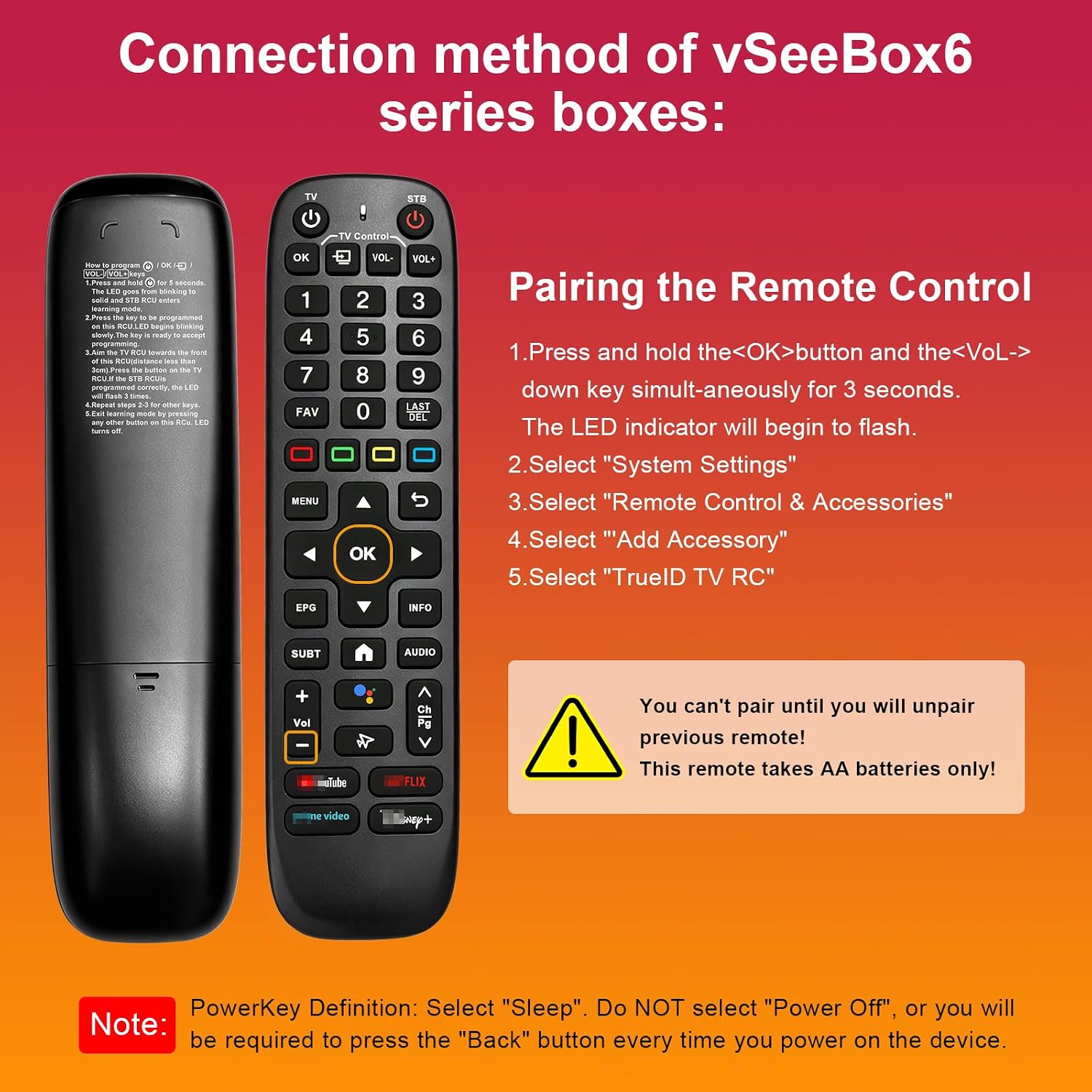
- 【Dual-Mode Flexible Use for Any Setup】Connection method of vSeeBox6 series boxes:Pairing the Remote Control 1.Press and hold the< OK >button and the< VOL->down key simult-aneously for 3 seconds. The LED indicator will begin to flash. 2.Select "System Settings" 3.Select "Remote Control & Accessories" 4.Select "Add Accessory" 5.Select "TruelD TV RC" Note: PowerKey Definition: Select "Sleep". Do NOT select "Power Off", or you willbe required to press the "Back" button every time you power on the device.
- 【Dual-Mode Flexible Operation for Any Setup】Default V6 mode is fit for v6 plus remote and fit for vseebox v5 pro remote. vseebox v3 pro remote,vseebox v3 plus remote.
- [Power Requirements & Setup] This remote requires 2 x AA batteries for Use (not included). For troubleshooting, if the device fails to function initially, simply try re-pairing it with your TV box to restore full smart control.
| ASIN | B0H4Q9TC3S |
|---|---|
| Brand | Rytuqo |
| Model Name | V6 Plus Remote |
| Manufacturer | Rytuqo |
| Model Number | V6 Plus Remote |
| Maximum Range | 40 Feet |
| Controller Type | Button Control |
| Compatible Devices | 1 |
| Additional Features | Backlit, Voice Search |
| Warranty Description | 2 year |
| Connectivity Technology | Bluetooth |
| Item Dimensions L x W x H | 0.1"L x 0.1"W x 0.1"H |
| Maximum Number of Supported Devices | 1 |




Bestseller ranking
Remote Controls


Customers who viewed this product also viewed
Swords




Correction of product information
If you notice any omissions or errors in the product information on this page, please use the correction request form below.
Correction Request Form